This project did not start from some grand automation vision. I built it to deal with clock-ins.
My company is not especially strict about attendance. Being late once in a while is not a big deal. But the records in Feishu stay there: late, missed, forgot to fix. A few bad entries are fine; a long streak of messy records is not. Sometimes I was already in the office, got distracted by work, and remembered to clock in only after the record was already ugly.
So the thinking was straightforward: if this task has no real value and still needs to happen every day, I should automate it.
The problem is that Feishu attendance lives inside a native app. There is no public API I can call. I cannot fake this with a simple HTTP request. Something has to actually open the app, navigate to the attendance page, read the current state, and decide whether to tap the button.
I already had a spare Android test phone plugged into my Mac, and AutoGLM had just been open-sourced. It fits this kind of problem well: give it a natural language instruction, let it inspect screenshots, understand the UI, and tap through the flow. What I needed to add was all the messy engineering around it:
- when to run
- whether today is really a workday
- how to randomize the time so it still looks human
- how to wake and unlock the phone
- how to prevent duplicate punches if the day was already handled
- how to leave enough logs and screenshots to debug failures later
In other words, AutoGLM only handles the last mile inside the app. Scheduling, state, and device control are all handled by my own scripts.
Architecture
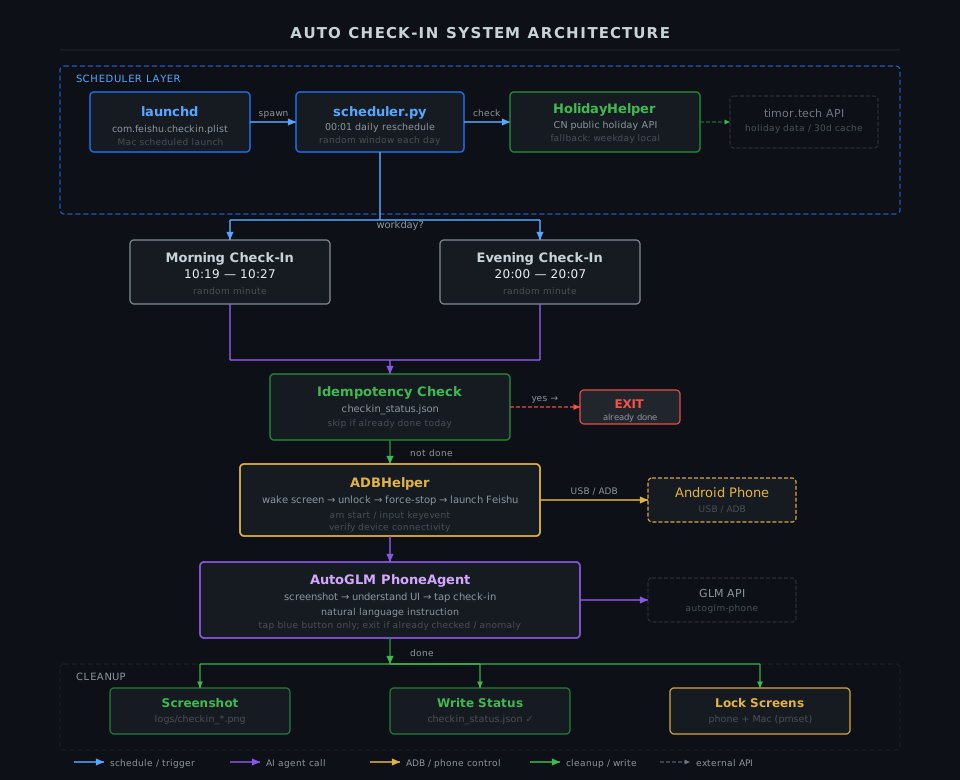
The full chain is simple:
launchd on macOS starts a Python scheduler. The scheduler re-generates that day's randomized check-in times. When a job fires, it uses ADB to wake and unlock the Android phone over USB, force-restarts Feishu, hands the in-app flow to AutoGLM, then saves a screenshot, updates a status file, and puts the screens back to sleep.
So this is not really an "AI system" in the magical sense. It is still conventional automation. I just used an agent for the one part that is annoying to hard-code: navigating a real mobile UI.
What actually happens every day
I run two check-in windows:
- Morning:
10:19to10:27 - Evening:
20:00to20:07
At 00:01 every day, the scheduler rebuilds that day's jobs. That way the exact trigger time gets re-randomized daily instead of drifting around a fixed offset.
When a job fires, the flow looks like this:
-
Check whether today is a workday
This is not just a weekday check. I call thetimor.techholiday API first, and only fall back to local Monday-to-Friday logic if the API is unavailable. -
Check whether this session has already been completed
Status is written tologs/checkin_status.json. If the current session for today already succeeded, the script exits immediately and does nothing else. -
Prepare the phone
Wake the screen with ADB, enter the lock-screen PIN, verify the device is reachable, then force-stop and relaunch Feishu so the app starts from a predictable state. -
Hand the in-app work to AutoGLM
The instruction is explicit: navigate to attendance, tap the morning or evening check-in button only if it is present, exit if the UI already says "clocked in at XX:XX", and do nothing if the state is abnormal. -
Clean up
Try to save a screenshot no matter what happened, write logs and status, then turn off the phone screen and sleep the Mac display.
The only "AI" part is step four. Everything around it is normal scripting and defensive engineering.
The parts that matter if you want this to survive real usage
1. Workday detection cannot be just Mon-Fri
This was an obvious early pitfall.
In China, makeup workdays and shifted holidays are common. A Saturday might be a workday; a weekday might be a holiday. If the script gets this wrong even once, that is a real problem.
So I wired in official holiday data through timor.tech, cached by year locally, with a 30-day cache lifetime. That keeps the network dependency light while still handling API outages gracefully.
2. The time has to be randomized
Firing at the exact same minute every day looks fake.
So both sessions run inside narrow time windows and get re-randomized after midnight. The behavior stays predictable enough for me, but the logs stop looking like a cron job pretending to be a person.
3. Idempotency is mandatory
Agents are not perfectly stable.
Sometimes ADB drops. Sometimes Feishu loads slowly. Sometimes AutoGLM times out before finding the right entry point. If retries are not guarded, the script can end up clicking again after the check-in already succeeded.
So the rule here is strict: if today's session is already marked successful, do not run again.
The status file looks like this:
{
  "2026-04-15": {
    "morning": {
      "success": true,
      "message": "morning check-in flow finished",
      "timestamp": "2026-04-15 10:24:37"
    }
  }
}
It is a plain local JSON file, which is boring, but for a single-machine script it is exactly the right amount of infrastructure.
4. The AutoGLM prompt needs boundaries, not just a goal
This matters more than I expected.
If the instruction is only "clock me in", the agent will improvise. That is dangerous. If the page already shows a completed check-in, it may still try to act. If the page shows a missing-punch state, it may wander into a correction flow.
So the prompt is written around constraints:
Tap only when the blue check-in button is visible. If the page already shows a completed check-in, exit. If the state is abnormal, do nothing and end the task.
Once the non-goals were written down clearly, the behavior got much more stable. With agents, "what not to do" is often as important as "what to do."
5. Screenshots and logs are not optional
When automation fails, the worst case is not failure itself. It is having no idea where it failed.
So every run tries to keep a screenshot, and the logs record the scheduler state, ADB connectivity, current app package, and the agent result. That makes it much easier to answer questions like:
- Did the USB connection drop?
- Did the phone fail to unlock?
- Did Feishu never reach the expected screen?
- Or did the agent just get lost in the UI?
A screenshot is much more useful than a generic "task failed" line.
How it performed over three months
From the logs, the failure modes are pretty narrow:
- ADB disconnects, usually because the USB connection is unstable
- Feishu lands in an unexpected state and the agent times out
Neither of those is really a logic bug. They are environment problems. What the script does well is wrap those unreliable edges with enough structure: workday detection, randomized timing, idempotency, screenshots, logs, and a clean retry path on the next run.
After three months, the success rate is around 95%, which I consider acceptable for a small tool stitched together from ADB, a spare phone, and an agent.
More importantly, this turned the problem from "I need to remember this every day" into "the system handles it and I check the logs occasionally." The attendance record stopped looking messy, and I stopped spending mental energy on something this trivial.
If you have a similar setup — some fixed sequence inside a mobile app, no API, and no desire to hand-write a brittle UIAutomator script — a phone agent like AutoGLM is worth trying.
It is not magic, and it is definitely not a silver bullet. The reason this worked for months is not the agent alone. It is all the unglamorous engineering around it.