One later change: when I wrote this, Claude's reset behavior looked more like hour-based rounding in my own usage: start at
7:18, reset at12:00. Later it looked more minute-based: start at7:18, reset at12:18. I still use round-hour examples below because they are easier to explain.
I start Claude Code / Codex early not because the automation itself matters, but because I want to move the budget windows into the hours when I actually use them.
I usually get to the office around 10:30, sometimes even 11:00. If I start the first window only after I arrive, the day naturally overlaps with about 2 windows. If I start one in the 7am slot, the day overlaps with 3.
Start with the simplest possible example
Assume Claude Code / Codex has something equivalent to 100K tokens of usable budget per 5h window.
If I only start after arriving, the day looks roughly like:
10-1515-20
That is about 200K.
If I start once in the 7am slot, it becomes:
7-1212-1717-22
All three overlap with my day, so the total becomes closer to 300K.
The core point is:
I am moving the budget I can touch during the day from 200K to 300K.
The picture makes it obvious
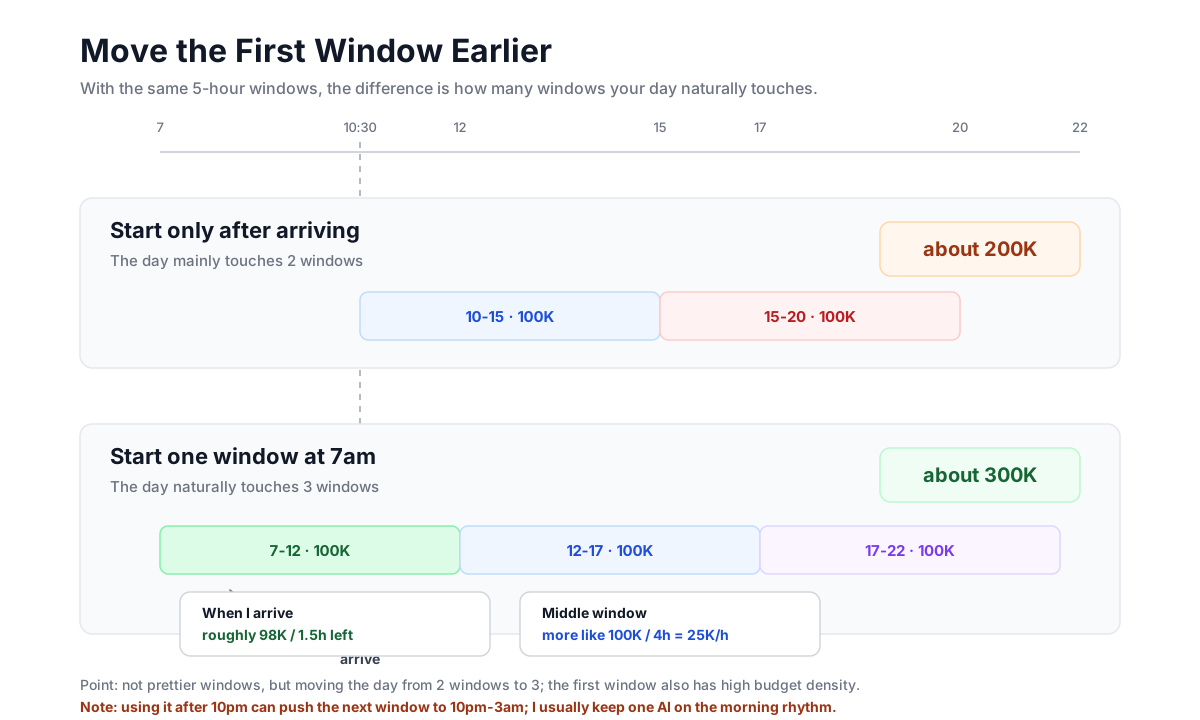
The top row is "start only after arriving."
The bottom row is "push the first window into the 7am slot."
The picture is only trying to say one thing:
- starting late means the day mainly touches two windows
- starting early means the day naturally touches three
The real point is budget density
Total budget is only the first layer. What changes the feeling more is budget density:
The same 100K feels very different depending on how much time you still have left to spend it.
Why the first window matters to me
Say the script sends one tiny "Good morning" message at 7, spending only 2K.
When I arrive at 10:30, that window only has until 12, so about 1.5h. But in budget terms:
- total budget:
100K - already spent:
2K - remaining budget:
98K - remaining time:
1.5h
That feels great.
In those 1.5h, I am holding almost a full window's budget. Of course I am more willing to use it. The first window is not valuable because it is long; it is valuable because the usable budget per remaining hour is high.
Why the middle window feels tighter
The middle window is different. If it is 12-17, and lunch takes 13-14, the usable time is only:
12-1314-17
That is 4h. If the total budget is still 100K, the density is:
100K / 4h = 25K/h
That window needs to carry the main afternoon block, so I naturally become more conservative.
The point is:
- the first window is not more valuable because I assigned it a special task
- it is more valuable because when I start using it, remaining budget is high and remaining time is short
- so the budget density is higher, and I use it more freely
The third window follows the same logic
The third window is useful for a simple reason. It usually covers:
17-1819-20- maybe a bit more after I get home
It is not assigned to a fixed type of task. It just keeps the day from stopping after two windows.
This is another full 100K block, and it lands inside hours when I may still use the tool.
This is not about assigning jobs to windows
I am not running a precise quota system like:
- Window 1 is for one kind of work
- Window 2 is for another
- Window 3 is for something else
Nor am I saying each window has to spend a fixed amount.
What actually happens is simpler:
- sometimes I spend hard in the first window
- sometimes I spend hard in the third
- the middle one is where I often hold back a little
The reason is not task type. It is budget density. The front and back windows often feel easier to spend from; the middle one has to stretch across a longer block, so I become more careful.
The script is not the important part
The implementation is basically:
launchdfires at07:05- add a random
0-5minute delay - open iTerm2
cdinto a fixed directory- start the proxy
- launch
claudeorcodex - wait
10seconds - send "Good morning"
Only two details matter:
- why randomize it: I do not want it to hit the exact same minute every day like an alarm clock
- why wait
10seconds: Claude / Codex sessions are not always stable immediately after launch, and sending too early can get swallowed
Everything else is just mechanism. The goal is still:
move the daytime reachable budget from 200K to 300K.
Watch out after 10pm
There is one catch.
If I keep using Claude or Codex after 10pm, the next window becomes 10pm to 3am. Then the timer around 7am the next morning can become useless: the rhythm has already been changed by the late-night usage, and it is no longer the 7-12 window I wanted.
So I try to be a little careful at night: after 10pm, I usually use only one AI and leave the other one in the normal rhythm. That way, at least one tool can still start in the 7am slot the next morning.
After using it for a while
After running this setup for a while, I found that the benefit is not only numerical.
The three windows slowly became a stable background rhythm for the day. I do not need to wake up and think, "How much budget do I still have today?" I do not need to stare at reset times either. The script runs, the windows move, and when I sit down I roughly know what is available.
It does not feel like "managing budget" as much as letting the tool rhythm fit into my own rhythm.
Once the tool state becomes predictable, things feel more orderly: when it will be full, when it will run low, when to spend hard, when to hold back. I do not need to recalculate it every day.
In the end
Tools change, but the way you think is still yours.
Maybe the important thing is not which tool you use, but whether you have designed a workflow that fits you.